Video
January 23, 2026

How Granular Filters Turn Visibility into Action

Stop drowning in data alerts. Metomic's granular filters help security teams identify real risks faster and eliminate alert fatigue for good.
Download
Download
Video
January 23, 2026

How Granular Filters Turn Visibility into Action

Stop drowning in data alerts. Metomic's granular filters help security teams identify real risks faster and eliminate alert fatigue for good.

Download
Download

Security teams face a paradox: comprehensive visibility into your data landscape is essential, but too much unfiltered information creates alert fatigue. When you're staring at thousands, or even millions, of assets, it's nearly impossible to identify what actually needs your attention. Yet at the same time, you can't afford to miss the files with genuine risk exposure.

This is where intelligent filtering becomes critical. With Metomic's granular filters, you don't need to compromise. Workflows help you respond when risk occurs. Granular Filters help you find it in the first place.

The Intelligence Advantage (Without the Overwhelm)

Metomic's Assets page shows you everything, that is: every single asset we're detecting across your integrated platforms. We call this our Intelligence page because complete visibility is an advantage when you need to investigate thoroughly.

But we also recognize that you need the ability to focus. Without proper filtering, comprehensive visibility quickly becomes information overload, leading to:

  • Alert fatigue and missed genuine risks
  • Wasted time reviewing low-priority assets
  • Slower incident response
  • Security teams spending hours hunting for what matters

Granular filters solve this by letting you cut through the noise and surface only the assets that require action.

Start Broad, Then Refine

The key to effective filtering is working from general to specific. Metomic gives you multiple ways to narrow your focus:

Quick Sort Options let you organize by total detection count, risk rating based on exposure level and classifier type (visualized by colored dots), asset creation date, or asset update date - all in ascending or descending order.

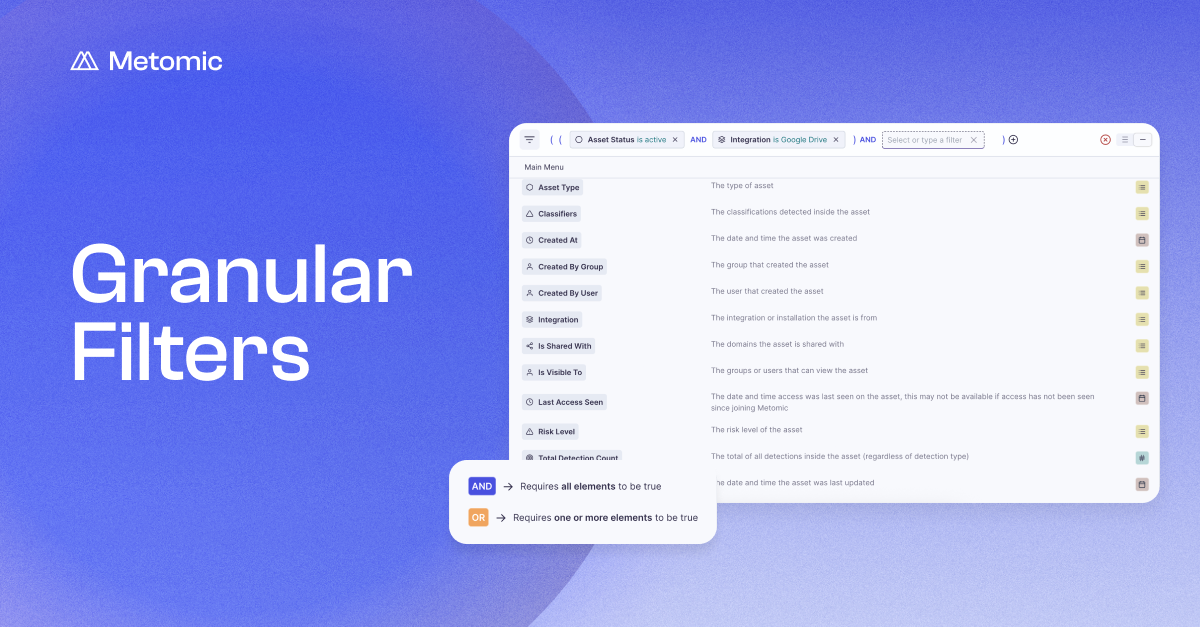
These high-level sorts are useful, but the real power comes from the filter bar at the top of the page.

Building Your Focused View

Here's how to transform thousands of results into a manageable, actionable list:

Start with an Integration. Rather than looking at everything at once, filter to a specific platform like Google Drive, Slack, or whichever integration you want to investigate. This immediately reduces your scope to what's relevant.

Add a Classifier. Once you've selected an integration, filter by the type of data you're concerned about: email addresses, credit card numbers, API keys, or any other classifier Metomic detects. Now you're looking at, for example, only Google Drive files containing email addresses.

Set a Volume Threshold. One email address in a document might not be risky. One hundred email addresses could indicate a data leak or misconfigured sharing settings. By setting a minimum detection threshold, you filter out the noise and focus on assets with significant exposure.

Refine by Exposure Level. If you want to prioritize immediate risk, apply an Asset Exposure filter to show only public or externally shared assets. This helps you tackle the most critical issues first.

In the training example, we started with around 5,000 assets. After filtering to Google Drive documents with at least 100 email address detections, we narrowed it down to just 5 assets—making it immediately clear which documents needed attention and which one was publicly shared and therefore highest risk.

Views You Can Save and Revisit

Once you've built a filter combination that works for your workflow, you don't need to recreate it every time. Metomic lets you save custom views, so you can return to your most important searches with a single click.

Whether you prefer list view or linear view, your saved filters adapt to how you work -giving you consistency and efficiency across investigations.

Faster Response, Fewer False Positives

Granular filtering fundamentally changes how your security team operates:

  • Reduced false positives: By setting intelligent thresholds and combining multiple filters, you eliminate low-priority alerts that don't require action.
  • Faster incident response: When a potential breach or compliance issue arises, you can immediately narrow to the relevant assets instead of hunting through thousands of files.
  • Better resource allocation: Your team focuses on genuine risks rather than wading through data that doesn't matter.

Security is all about seeing what matters, when it matters.

👉 Learn more about Granular Filtering.
Security teams face a paradox: comprehensive visibility into your data landscape is essential, but too much unfiltered information creates alert fatigue. When you're staring at thousands, or even millions, of assets, it's nearly impossible to identify what actually needs your attention. Yet at the same time, you can't afford to miss the files with genuine risk exposure.

This is where intelligent filtering becomes critical. With Metomic's granular filters, you don't need to compromise. Workflows help you respond when risk occurs. Granular Filters help you find it in the first place.

The Intelligence Advantage (Without the Overwhelm)

Metomic's Assets page shows you everything, that is: every single asset we're detecting across your integrated platforms. We call this our Intelligence page because complete visibility is an advantage when you need to investigate thoroughly.

But we also recognize that you need the ability to focus. Without proper filtering, comprehensive visibility quickly becomes information overload, leading to:

  • Alert fatigue and missed genuine risks
  • Wasted time reviewing low-priority assets
  • Slower incident response
  • Security teams spending hours hunting for what matters

Granular filters solve this by letting you cut through the noise and surface only the assets that require action.

Start Broad, Then Refine

The key to effective filtering is working from general to specific. Metomic gives you multiple ways to narrow your focus:

Quick Sort Options let you organize by total detection count, risk rating based on exposure level and classifier type (visualized by colored dots), asset creation date, or asset update date - all in ascending or descending order.

These high-level sorts are useful, but the real power comes from the filter bar at the top of the page.

Building Your Focused View

Here's how to transform thousands of results into a manageable, actionable list:

Start with an Integration. Rather than looking at everything at once, filter to a specific platform like Google Drive, Slack, or whichever integration you want to investigate. This immediately reduces your scope to what's relevant.

Add a Classifier. Once you've selected an integration, filter by the type of data you're concerned about: email addresses, credit card numbers, API keys, or any other classifier Metomic detects. Now you're looking at, for example, only Google Drive files containing email addresses.

Set a Volume Threshold. One email address in a document might not be risky. One hundred email addresses could indicate a data leak or misconfigured sharing settings. By setting a minimum detection threshold, you filter out the noise and focus on assets with significant exposure.

Refine by Exposure Level. If you want to prioritize immediate risk, apply an Asset Exposure filter to show only public or externally shared assets. This helps you tackle the most critical issues first.

In the training example, we started with around 5,000 assets. After filtering to Google Drive documents with at least 100 email address detections, we narrowed it down to just 5 assets—making it immediately clear which documents needed attention and which one was publicly shared and therefore highest risk.

Views You Can Save and Revisit

Once you've built a filter combination that works for your workflow, you don't need to recreate it every time. Metomic lets you save custom views, so you can return to your most important searches with a single click.

Whether you prefer list view or linear view, your saved filters adapt to how you work -giving you consistency and efficiency across investigations.

Faster Response, Fewer False Positives

Granular filtering fundamentally changes how your security team operates:

  • Reduced false positives: By setting intelligent thresholds and combining multiple filters, you eliminate low-priority alerts that don't require action.
  • Faster incident response: When a potential breach or compliance issue arises, you can immediately narrow to the relevant assets instead of hunting through thousands of files.
  • Better resource allocation: Your team focuses on genuine risks rather than wading through data that doesn't matter.

Security is all about seeing what matters, when it matters.

👉 Learn more about Granular Filtering.
Security teams face a paradox: comprehensive visibility into your data landscape is essential, but too much unfiltered information creates alert fatigue. When you're staring at thousands, or even millions, of assets, it's nearly impossible to identify what actually needs your attention. Yet at the same time, you can't afford to miss the files with genuine risk exposure.

This is where intelligent filtering becomes critical. With Metomic's granular filters, you don't need to compromise. Workflows help you respond when risk occurs. Granular Filters help you find it in the first place.

The Intelligence Advantage (Without the Overwhelm)

Metomic's Assets page shows you everything, that is: every single asset we're detecting across your integrated platforms. We call this our Intelligence page because complete visibility is an advantage when you need to investigate thoroughly.

But we also recognize that you need the ability to focus. Without proper filtering, comprehensive visibility quickly becomes information overload, leading to:

  • Alert fatigue and missed genuine risks
  • Wasted time reviewing low-priority assets
  • Slower incident response
  • Security teams spending hours hunting for what matters

Granular filters solve this by letting you cut through the noise and surface only the assets that require action.

Start Broad, Then Refine

The key to effective filtering is working from general to specific. Metomic gives you multiple ways to narrow your focus:

Quick Sort Options let you organize by total detection count, risk rating based on exposure level and classifier type (visualized by colored dots), asset creation date, or asset update date - all in ascending or descending order.

These high-level sorts are useful, but the real power comes from the filter bar at the top of the page.

Building Your Focused View

Here's how to transform thousands of results into a manageable, actionable list:

Start with an Integration. Rather than looking at everything at once, filter to a specific platform like Google Drive, Slack, or whichever integration you want to investigate. This immediately reduces your scope to what's relevant.

Add a Classifier. Once you've selected an integration, filter by the type of data you're concerned about: email addresses, credit card numbers, API keys, or any other classifier Metomic detects. Now you're looking at, for example, only Google Drive files containing email addresses.

Set a Volume Threshold. One email address in a document might not be risky. One hundred email addresses could indicate a data leak or misconfigured sharing settings. By setting a minimum detection threshold, you filter out the noise and focus on assets with significant exposure.

Refine by Exposure Level. If you want to prioritize immediate risk, apply an Asset Exposure filter to show only public or externally shared assets. This helps you tackle the most critical issues first.

In the training example, we started with around 5,000 assets. After filtering to Google Drive documents with at least 100 email address detections, we narrowed it down to just 5 assets—making it immediately clear which documents needed attention and which one was publicly shared and therefore highest risk.

Views You Can Save and Revisit

Once you've built a filter combination that works for your workflow, you don't need to recreate it every time. Metomic lets you save custom views, so you can return to your most important searches with a single click.

Whether you prefer list view or linear view, your saved filters adapt to how you work -giving you consistency and efficiency across investigations.

Faster Response, Fewer False Positives

Granular filtering fundamentally changes how your security team operates:

  • Reduced false positives: By setting intelligent thresholds and combining multiple filters, you eliminate low-priority alerts that don't require action.
  • Faster incident response: When a potential breach or compliance issue arises, you can immediately narrow to the relevant assets instead of hunting through thousands of files.
  • Better resource allocation: Your team focuses on genuine risks rather than wading through data that doesn't matter.

Security is all about seeing what matters, when it matters.

👉 Learn more about Granular Filtering.