Video
January 9, 2026

Automate Protection with Asset-Based Workflows

Automate security responses with Metomic's Asset-Based Workflows. Enforce policies instantly when risky assets are created or updated.
Download
Download
Video
January 9, 2026

Automate Protection with Asset-Based Workflows

Automate security responses with Metomic's Asset-Based Workflows. Enforce policies instantly when risky assets are created or updated.

Download
Download

Security teams are constantly playing catch-up. By the time you discover a misconfigured file, review it manually, contact the owner, and wait for them to fix it, the damage may already be done. Sensitive data could be exposed, shared externally, or downloaded by unauthorized users.

Manual security processes don't scale and they leave critical gaps. You need automation that acts the moment risk appears, without waiting for human intervention.

Metomic's Asset-Based Workflows let you define security policies once and enforce them automatically across every asset in your environment. When an asset is created or updated and meets your conditions, Metomic takes action immediately, from notifying owners, to alerting your security team, or even revoking access before exposure becomes a breach.

Define the asset conditions to start building your workflow

Asset-Based vs. Event-Based: When to Use Each

Metomic offers two types of automated workflows, each designed for different scenarios:

Event-Based Workflows trigger when something happens to an asset, like a file being downloaded, shared externally, or accessed by a specific user. These are ideal for monitoring activity and responding to risky behavior in real time.

Asset-Based Workflows trigger when an asset is newly created or updated and matches specific conditions, for example those containing credit card numbers and being shared publicly. These are ideal for enforcing data security policies proactively, catching risks at the source before they escalate.

Building Your Asset-Based Workflow

Creating an automated workflow in Metomic is straightforward. Here's how it works:

Start with a Name and Incident Status. Give your workflow a clear name, then assign an incident status: critical, high, medium, or low. This helps your team prioritize which workflows require immediate attention and ensures alignment across your organization on what constitutes each severity level.

Define Your Asset Conditions. This is where you specify what triggers the workflow. Using filters similar to those on the Assets page, you can set conditions based on integration (like Google Drive or Slack), classifier (like credit card numbers or API keys), exposure level, volume thresholds, or other attributes. The workflow will only trigger when an asset meets all the conditions you've defined.

You can view your conditions in linear or list view, making it easy to understand exactly what the workflow will catch.

Add Actions. Once your conditions are set, you decide what happens next. If you set the incident status to critical and add no actions, Metomic will simply create an incident for your team to review. But the real power comes from adding automated actions:

  • Notify the asset owner directly, prompting them to take corrective action
  • Alert your security team in a Slack channel, ensuring immediate visibility
  • Take immediate action like revoking sharing permissions or restricting access

You can add multiple actions to a single workflow, or configure fallback actions if the primary action fails. These automations run without human intervention, ensuring consistent enforcement of your security policies.
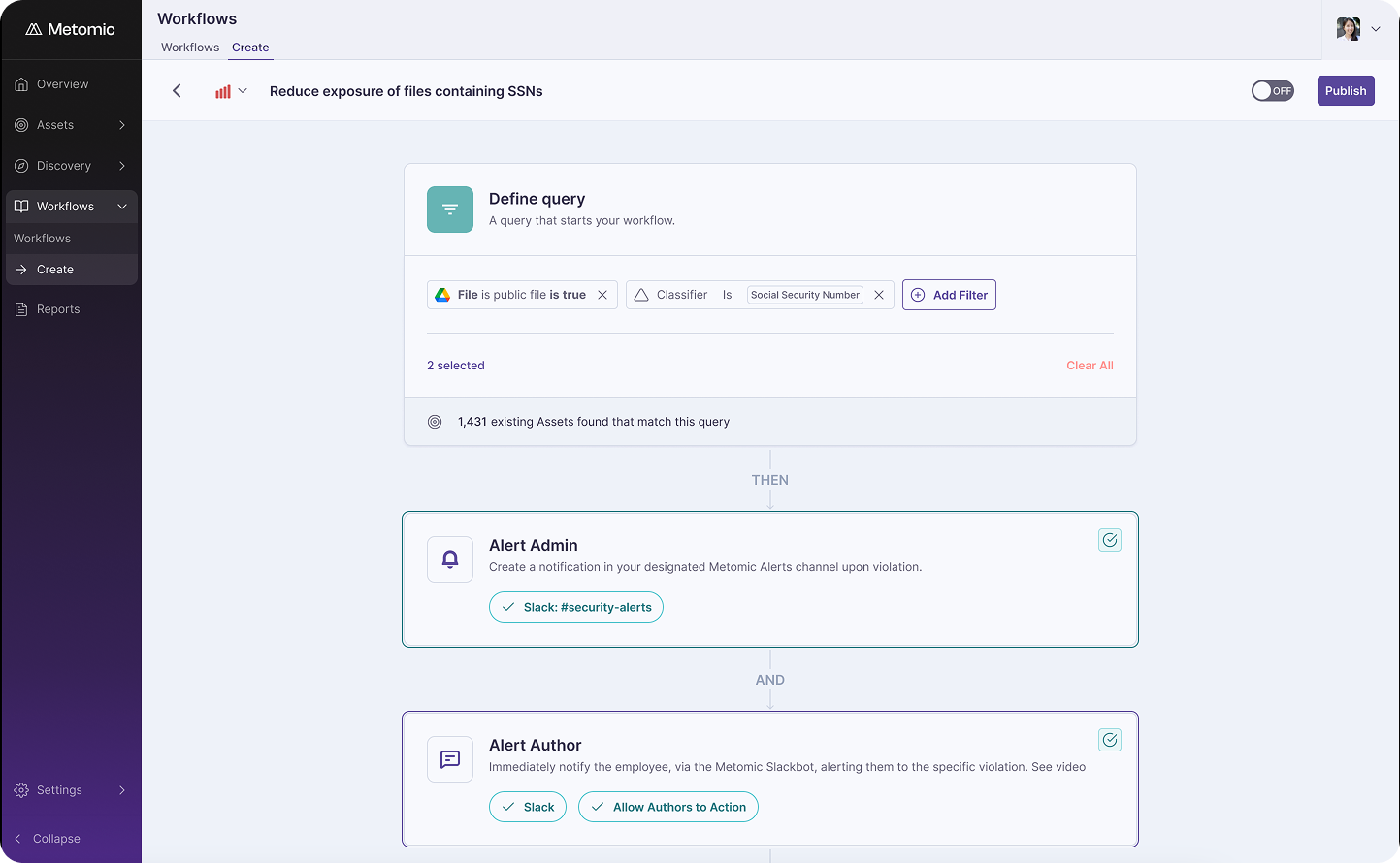
Set automations to notify both the asset owner directly and your security team

Publish and Activate. When you're ready, publish the workflow and turn it on. Your active workflows will appear in your workflow list, where you can monitor incidents that are open, in review, or closed. You can even automate the closure and review statuses, further reducing manual overhead.

Automation That Scales with Your Business

Asset-Based Workflows fundamentally change how security operates:

  • Automated enforcement: Security policies are applied consistently across every asset, every time - no exceptions, no delays.
  • Faster response times: Action happens the moment risk is detected, not hours or days later after manual review.
  • Reduced manual work: Your team focuses on exceptions and critical incidents rather than routine policy enforcement.

Security risks won’t wait. But with the right workflows in place, neither will your response.

👉 Learn more about Metomic Asset-Based Workflows.

Security teams are constantly playing catch-up. By the time you discover a misconfigured file, review it manually, contact the owner, and wait for them to fix it, the damage may already be done. Sensitive data could be exposed, shared externally, or downloaded by unauthorized users.

Manual security processes don't scale and they leave critical gaps. You need automation that acts the moment risk appears, without waiting for human intervention.

Metomic's Asset-Based Workflows let you define security policies once and enforce them automatically across every asset in your environment. When an asset is created or updated and meets your conditions, Metomic takes action immediately, from notifying owners, to alerting your security team, or even revoking access before exposure becomes a breach.

Define the asset conditions to start building your workflow

Asset-Based vs. Event-Based: When to Use Each

Metomic offers two types of automated workflows, each designed for different scenarios:

Event-Based Workflows trigger when something happens to an asset, like a file being downloaded, shared externally, or accessed by a specific user. These are ideal for monitoring activity and responding to risky behavior in real time.

Asset-Based Workflows trigger when an asset is newly created or updated and matches specific conditions, for example those containing credit card numbers and being shared publicly. These are ideal for enforcing data security policies proactively, catching risks at the source before they escalate.

Building Your Asset-Based Workflow

Creating an automated workflow in Metomic is straightforward. Here's how it works:

Start with a Name and Incident Status. Give your workflow a clear name, then assign an incident status: critical, high, medium, or low. This helps your team prioritize which workflows require immediate attention and ensures alignment across your organization on what constitutes each severity level.

Define Your Asset Conditions. This is where you specify what triggers the workflow. Using filters similar to those on the Assets page, you can set conditions based on integration (like Google Drive or Slack), classifier (like credit card numbers or API keys), exposure level, volume thresholds, or other attributes. The workflow will only trigger when an asset meets all the conditions you've defined.

You can view your conditions in linear or list view, making it easy to understand exactly what the workflow will catch.

Add Actions. Once your conditions are set, you decide what happens next. If you set the incident status to critical and add no actions, Metomic will simply create an incident for your team to review. But the real power comes from adding automated actions:

  • Notify the asset owner directly, prompting them to take corrective action
  • Alert your security team in a Slack channel, ensuring immediate visibility
  • Take immediate action like revoking sharing permissions or restricting access

You can add multiple actions to a single workflow, or configure fallback actions if the primary action fails. These automations run without human intervention, ensuring consistent enforcement of your security policies.

Set automations to notify both the asset owner directly and your security team

Publish and Activate. When you're ready, publish the workflow and turn it on. Your active workflows will appear in your workflow list, where you can monitor incidents that are open, in review, or closed. You can even automate the closure and review statuses, further reducing manual overhead.

Automation That Scales with Your Business

Asset-Based Workflows fundamentally change how security operates:

  • Automated enforcement: Security policies are applied consistently across every asset, every time - no exceptions, no delays.
  • Faster response times: Action happens the moment risk is detected, not hours or days later after manual review.
  • Reduced manual work: Your team focuses on exceptions and critical incidents rather than routine policy enforcement.

Security risks won’t wait. But with the right workflows in place, neither will your response.

👉 Learn more about Metomic Asset-Based Workflows.

Security teams are constantly playing catch-up. By the time you discover a misconfigured file, review it manually, contact the owner, and wait for them to fix it, the damage may already be done. Sensitive data could be exposed, shared externally, or downloaded by unauthorized users.

Manual security processes don't scale and they leave critical gaps. You need automation that acts the moment risk appears, without waiting for human intervention.

Metomic's Asset-Based Workflows let you define security policies once and enforce them automatically across every asset in your environment. When an asset is created or updated and meets your conditions, Metomic takes action immediately, from notifying owners, to alerting your security team, or even revoking access before exposure becomes a breach.

Define the asset conditions to start building your workflow

Asset-Based vs. Event-Based: When to Use Each

Metomic offers two types of automated workflows, each designed for different scenarios:

Event-Based Workflows trigger when something happens to an asset, like a file being downloaded, shared externally, or accessed by a specific user. These are ideal for monitoring activity and responding to risky behavior in real time.

Asset-Based Workflows trigger when an asset is newly created or updated and matches specific conditions, for example those containing credit card numbers and being shared publicly. These are ideal for enforcing data security policies proactively, catching risks at the source before they escalate.

Building Your Asset-Based Workflow

Creating an automated workflow in Metomic is straightforward. Here's how it works:

Start with a Name and Incident Status. Give your workflow a clear name, then assign an incident status: critical, high, medium, or low. This helps your team prioritize which workflows require immediate attention and ensures alignment across your organization on what constitutes each severity level.

Define Your Asset Conditions. This is where you specify what triggers the workflow. Using filters similar to those on the Assets page, you can set conditions based on integration (like Google Drive or Slack), classifier (like credit card numbers or API keys), exposure level, volume thresholds, or other attributes. The workflow will only trigger when an asset meets all the conditions you've defined.

You can view your conditions in linear or list view, making it easy to understand exactly what the workflow will catch.

Add Actions. Once your conditions are set, you decide what happens next. If you set the incident status to critical and add no actions, Metomic will simply create an incident for your team to review. But the real power comes from adding automated actions:

  • Notify the asset owner directly, prompting them to take corrective action
  • Alert your security team in a Slack channel, ensuring immediate visibility
  • Take immediate action like revoking sharing permissions or restricting access

You can add multiple actions to a single workflow, or configure fallback actions if the primary action fails. These automations run without human intervention, ensuring consistent enforcement of your security policies.

Set automations to notify both the asset owner directly and your security team

Publish and Activate. When you're ready, publish the workflow and turn it on. Your active workflows will appear in your workflow list, where you can monitor incidents that are open, in review, or closed. You can even automate the closure and review statuses, further reducing manual overhead.

Automation That Scales with Your Business

Asset-Based Workflows fundamentally change how security operates:

  • Automated enforcement: Security policies are applied consistently across every asset, every time - no exceptions, no delays.
  • Faster response times: Action happens the moment risk is detected, not hours or days later after manual review.
  • Reduced manual work: Your team focuses on exceptions and critical incidents rather than routine policy enforcement.

Security risks won’t wait. But with the right workflows in place, neither will your response.

👉 Learn more about Metomic Asset-Based Workflows.