Why You Need Stronger Google Drive Label Governance Before Exposure Grows
Data classification is foundational to every modern security programme, yet historically one of the least reliable due to its dependence on user behaviour. Metomic’s Google Drive Labelling feature fixes that by operationalising classification at scale.
.png)
Why You Need Stronger Google Drive Label Governance Before Exposure Grows
Data classification is foundational to every modern security programme, yet historically one of the least reliable due to its dependence on user behaviour. Metomic’s Google Drive Labelling feature fixes that by operationalising classification at scale.
Most organisations have years of unmanaged, overshared files sitting in Google Drive. Labels exist to bring structure and control to this data, but they’re rarely applied consistently and even more rarely enforced.
The result: entitlement creep, unclear ownership, and sensitive information sitting in locations it shouldn’t. Metomic automates detection of sensitive data, applies and updates Drive labels accurately, and enforces access policies to reduce exposure across the business. This gives CISOs confidence that Drive is governed, compliant, and ready for future initiatives such as wider AI-enabled search and automation.
Google Drive Has Become a Blind Spot for CISOs
Most companies rely heavily on Google Drive. In fact, there are over 11 million paying business customers using Google Workspace. However, governance hasn’t evolved at the same pace as data creation. Over time, Drive becomes a catch-all:
- Outdated documents
- Duplicated files
- Sensitive information stored in the wrong place
- Permissions granted years ago that no one remembers
- Files shared externally that were never reviewed again
Employees often have access to information they shouldn’t, and visibility drops as the environment grows. The access model itself makes it easy for misconfigurations to persist silently in the background.
This creates a structural problem for CISOs: you can’t enforce policy on a system you can’t fully see or trust.
Labels Should Solve This (But Often They Don’t)
Google Drive labels are meant to help organisations classify and control their information, and in theory they should make governance straightforward. In reality, they’re rarely applied consistently. Our Google Scanner report found that 40% Of Google Drive files contain sensitive information. Labels go stale as files move or change owners, and sensitive content often sits unlabelled altogether. When labels drift out of sync with the actual contents of a file, the policies built on top of them become unreliable.
Security teams frequently discover that the labels they depend on for governance don’t match what’s truly in Drive. As this misalignment grows across thousands of files, audits slow down, exposure grows, and CISOs lose confidence in the accuracy of the environment they’re reporting on.
Manual classification simply cannot scale. Employees forget to label files, mislabel them, or skip classification entirely; especially across years of accumulated content. Metomic replaces that unreliable process with automation that ensures:
- Sensitive spreadsheets containing financial projections get labelled “Confidential.”
- Files containing PII are marked “Restricted,” even if an employee never touched the label.
- Board decks and executive materials receive “Highly Confidential” by default.
This eliminates blind spots, improves governance outcomes, and creates consistent enforcement aligned to policy, not user behaviour.
Where Metomic Strengthens Google Drive Governance
1. Historical Data Cleanup
Run automated bulk jobs that scan existing files, detect sensitive content (e.g., SSNs, credit cards), and apply the correct label at scale — essential for rectifying misclassified data and achieving certifications like ISO 27001.
2. AI Readiness
Before enabling AI tools like Google Gemini, organisations must ensure sensitive files aren’t accidentally surfaced. Metomic classifies and labels board docs, financials, and other high-risk data in advance so AI systems only access what’s safe.
3. Policy Enforcement
Workflows can use labels as conditions: If an “Internal” file is shared externally, Metomic can automatically revoke access or alert security. This enforces organisational policy without relying on employees to get it right.
4. User Education
Metomic can notify file owners when a document lacks a label, prompting them to classify it. If they don’t respond, Metomic applies a default like “Confidential” automatically — blending user awareness with automated enforcement.
Core Capabilities
Automated Label Application
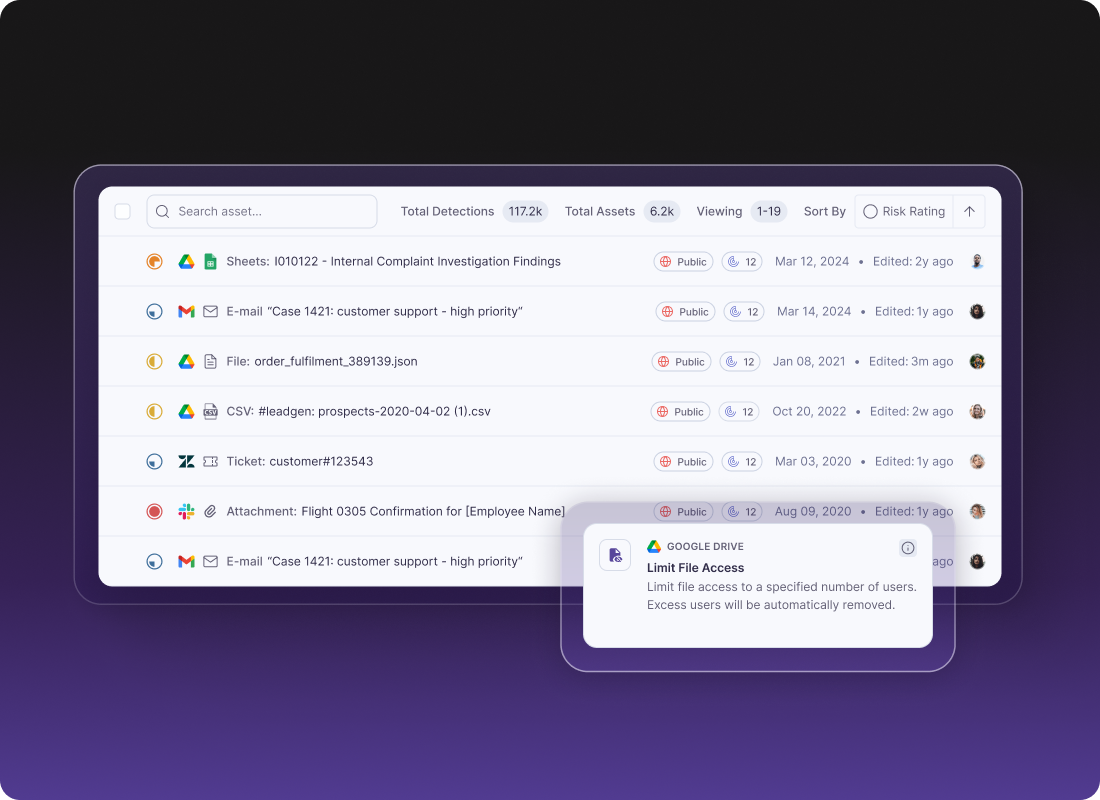
Metomic eliminates the classification gap between file creation and security enforcement. Files are automatically labelled based on filters, content detections, or business rules — ensuring complete coverage, accurate governance, and visibility into mislabelled or unlabelled content.
Policy-Driven Label Enforcement
Labels become actionable security controls. For example:
- Files labelled “Highly Confidential” can be prevented from external sharing.
- “Restricted” files can have downloading, printing, or copying disabled.
Metomic aligns protection levels with the sensitivity of the data, not assumptions.
User-Driven Labelling
Employees receive Slack or email prompts when files lack classification, with one-click options to apply labels. If ignored, Metomic applies a default label automatically. This builds a culture of security without slowing down workflows.
Dynamic Label Management
Files evolve and so should their labels. If a document originally labelled “Internal” gains customer data, Metomic can automatically escalate its label to “Confidential,” ensuring classification always reflects current risk, not outdated assumptions.
Clean Up Your Enterprise's Google Drive
Data classification is foundational to every modern security programme, yet historically one of the least reliable due to its dependence on user behaviour. Metomic’s Google Drive Labelling feature fixes that by operationalising classification at scale. The result: Accurate labels. Automated enforcement. User-friendly workflows. Stronger protection where your data actually lives.
Read the Report
Uncover the hidden risks in your Google Drive by downloading Metomic’s Google Scanner Report, revealing that 40.2% of scanned files contain sensitive data and 34.2% are shared externally, with 18,000 flagged as 'Critical Level' – then, see how Metomic’s DLP tool provides full visibility and control to prevent data breaches by booking a personalised demo today.